YoutubeGet Article
YoutubeGet Links
- Buy YoutubeGet
- Try YoutubeGet
- YoutubeGet Screenshots
- YoutubeGet Tutorial
- YoutubeGet FAQ
- YoutubeGet Support
- YoutubeGet Contact
- YouTube Music Downloader
- MP4 To MP3 Converter
- PDF To Excel Converter
- PDFZilla
- Zilla PDF to TXT Converter
- PDFTiger - PDF Creator & Converter
- PDF To JPG Converter
- Reezaa MP3 Converter
- PDF To WORD Converter
- JPG To PDF
- PDF To JPG
- WAV To MP3
- YouTube Layouts
- PDF OCR
- FLAC To MP3
- JPG To PDF Converter
- FLV To MP3 Converter
- AltaVista
YouTubeGet Tutorial - How to Use YouTubeGet (5/7)
-
<<< Previous Page (5/7) Next Page >>>
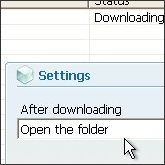
It should be noted that the button Settings makes it possible to define what will do the program after the downloading of the videos:
- In the menu "After downloading", Choose:
* Open the folder : open the download folder automatically after the downloading.
* Do Nothing : Don't open the folder.
<<< Previous Page (5/7) Next Page >>>
Article Link: http://www.youtubeget.com/tutorial5.html
Download Your Favorite YouTube Video Now
-

Name: YouTubeGet
Version: V5
Size: 5.71MB
OS: Windows 2000/XP/2003/Vista
License: Shareware
Price: $29.95
Description: YouTubeGet is an all-in-one software designed to make quick and easy work to download YouTube videos and convert them. Offering a multitude of methods to acquire the video, this application has all the power you need while still remaining small and easy to use. After downloading videos it will auto convert FLV files to MP4, 3GP, AVI, WMV, MOV etc. Soon, you can see YouTube videos on your MP4 or Cell phone.